
Updated October 5, 2026. This comparison is published by Okou and is based on the official product documentation linked below, plus a current walkthrough of the Okou web app. It is a guide to fit, not a performance benchmark.
A team looking for a Claude alternative usually has a practical question: which product will finish the work, use the right tools, and fit the way the team already operates?
Okou is a cloud AI teammate for research, reports, presentations, connected business tasks, and recurring workflows. You describe an outcome in chat, give it the relevant context and access, and review the result. It is designed for founders, operators, marketing and sales teams, and other people who want work completed without setting up a development environment.
Claude also does real work. Claude Tag acts in shared Slack conversations; Claude Code builds and changes software across several interfaces; Claude Cowork carries out multi-step tasks with files and connected tools. The useful comparison is how each product fits your team's work—not whether one can act and the others can only answer.
At a glance: which product fits the job?
| Product | A useful starting point when… |
|---|---|
| Okou | You want a cloud workspace for business deliverables, connected tasks, and reusable team workflows, with model choices enabled for your workspace. |
| Claude Tag | Your team wants to delegate work to Claude in shared Slack channels, with access and connections configured by an admin. |
| Claude Code | The main output is a software change that needs code review and testing, using a terminal, IDE, desktop app, or web interface. |
| Claude Cowork | Your work centers on documents, research, spreadsheets, and local files, with connectors and skills in Claude Desktop. |
These categories overlap. A successful trial should use the same real task, source material, and review requirements in each shortlisted product.
What Okou does today
Okou works from cloud computers. It can research a question, work with files, use connected services, and return a usable deliverable. Tasks can continue after you close the browser, subject to available credits, permissions, and any input the task needs from you.
Common business use cases include:
- Research and decisions: compare suppliers, investigate a market, prepare for a customer meeting, or assemble a sourced brief.
- Documents and presentations: turn notes and data into a report, spreadsheet, presentation, or shareable website.
- Sales and operations: review an inbox, prepare reply drafts, enrich authorized CRM records, or consolidate a weekly operating update.
- Recurring work: reuse a workflow and attach a supported schedule or event trigger so a routine task starts automatically.
Here is a small example from the current product: a real Okou response turning fictional notes into an operating brief.
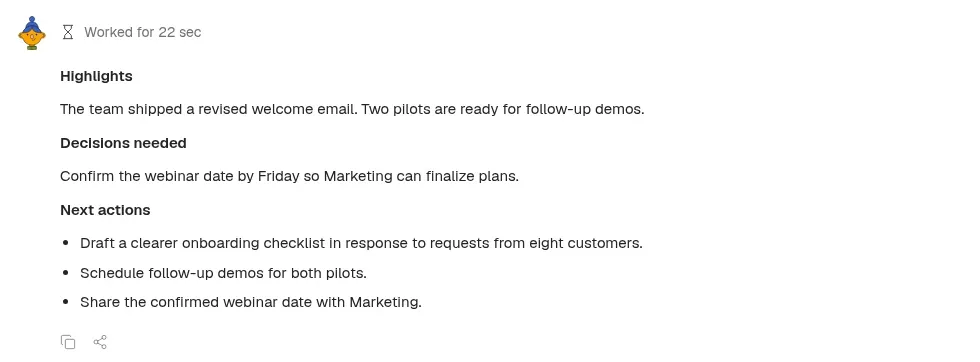
Live Okou web app, captured October 5, 2026. The notes are fictional demo data. This example demonstrates a written brief; it does not demonstrate sending an email or changing another system.
Connected tools and explicit access
Okou provides a searchable connector directory for services such as Gmail, Google Drive, Google Calendar, Slack, and CRM tools. Connecting an account and granting an agent permission to use it are separate decisions. Availability depends on the service, connected account, and action being requested.
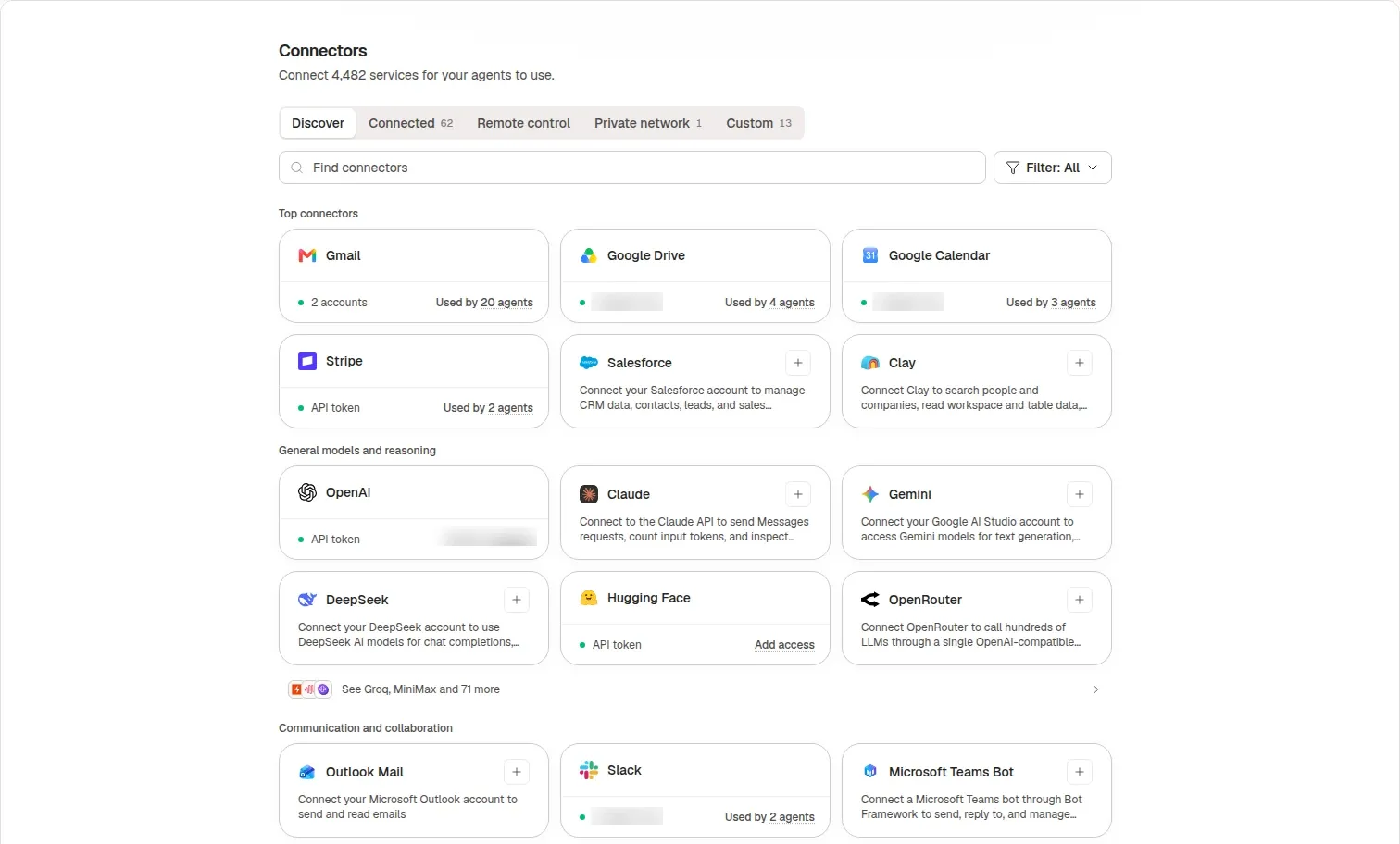
Captured from the live product on October 5, 2026. Account identifiers are blurred. A connector's presence in the directory does not mean every agent already has permission to use it.
For example, an inbox workflow can be scoped to review messages and prepare drafts. Sending a message or writing to another system should follow the permissions and review steps configured for that job.
Reusable work across the team
An Okou workflow packages instructions that can be reused. Shared workflows let teammates start from an established process, while an automation supplies the schedule or event that starts a run. Those are separate parts of the setup: saving a workflow does not by itself make it run every morning.
This is useful for repeatable business work, such as a weekly pipeline brief or a customer-meeting preparation routine. The team still needs to choose the data sources, define what a good result looks like, and decide which actions require review.
Model choice in the workspace
Okou's model picker supports the choices enabled for your workspace, including models from different providers. The current interface also exposes controls for effort and, where supported, speed. Provider configuration and bring-your-own-key availability affect what a particular user sees.
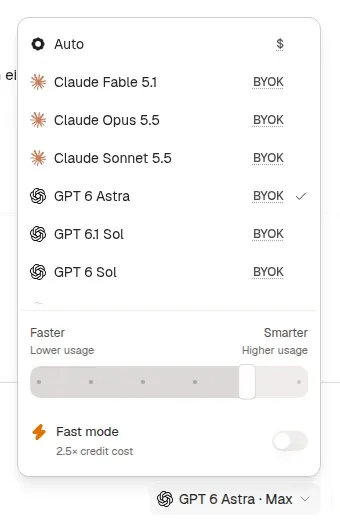
A crop of the live model picker, captured October 5, 2026. This is the captured workspace's configuration, not a promise that every plan or workspace exposes the same models or billing options.
Where Claude Tag fits
Claude Tag is a substantial alternative for teams whose work already happens in Slack. A person can tag Claude in a channel or thread and hand it a task. Claude runs in an ephemeral sandbox and can use the connections, plugins, and skills made available to it.
Anthropic's current documentation lists Claude Tag for Team and Enterprise plans on its first-party service. Channel work uses organization-level usage billing, while some direct-message behavior depends on the sender's Claude account and seat. Admins control where Claude is available and what it can access.
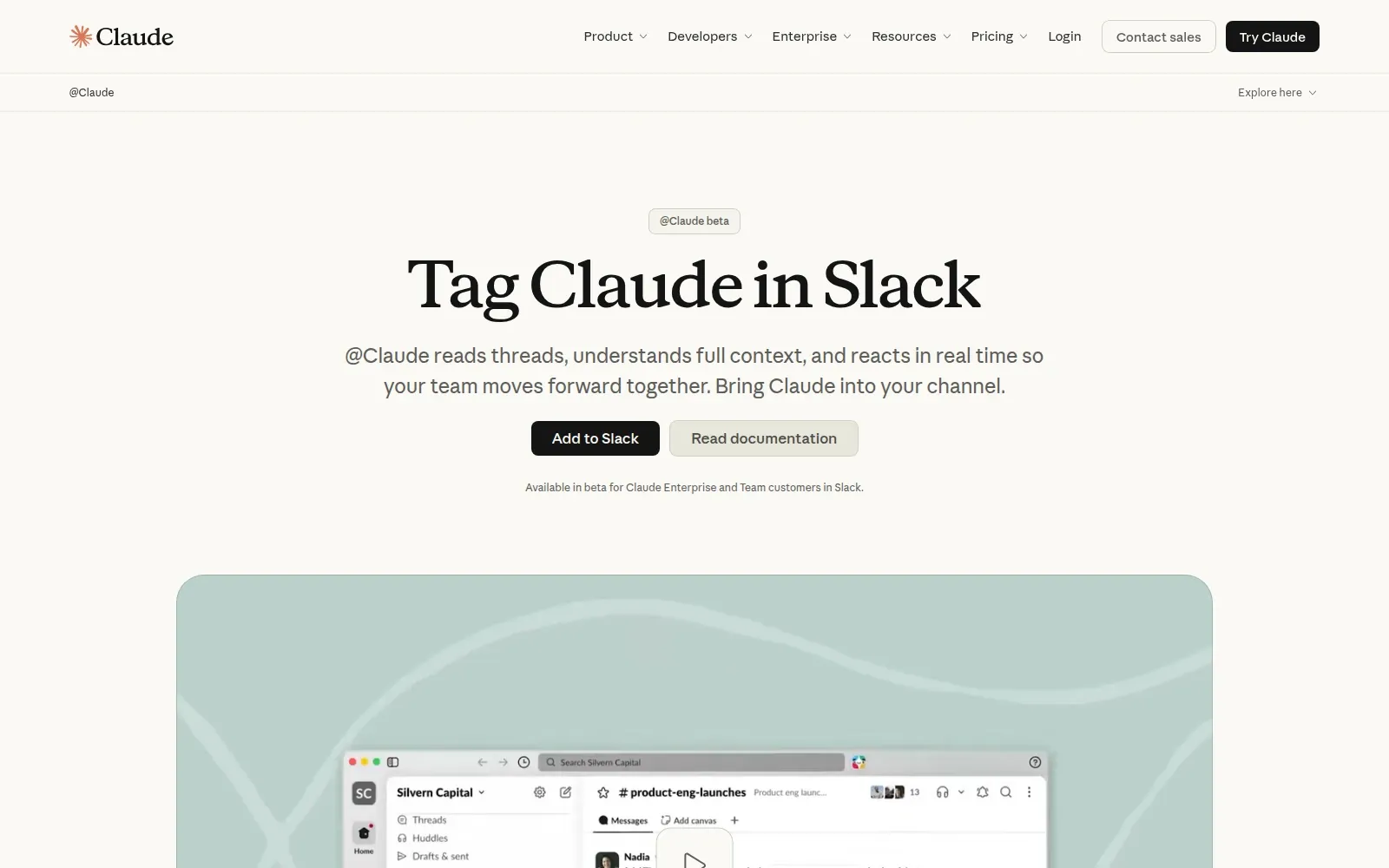
Claude Tag's official product page, captured October 5, 2026. This is Anthropic's product presentation, not a screenshot of our own authenticated Claude workspace.
Tag also supports ongoing work and follow-ups. It would be inaccurate to describe it as a passive chat assistant, or to claim that shared context and scheduled work are unique to Okou.
Choose between the two by testing the job and the work surface. Claude Tag is worth a close look for shared, Slack-centered work in a Claude organization. Okou is worth evaluating when you want a cloud workspace with its own agents, workflow library, connected tools, and workspace-level model choices.
Where Claude Code fits
Claude Code is built around software development: understanding a codebase, editing files, running commands, and working across development tools. It is available in the terminal, IDE extensions, a desktop app, and the web. Its desktop documentation also describes parallel sessions, connectors, and cloud sessions that can continue when the computer is off.
If your main deliverable is a tested software change, Claude Code may be the more direct fit. Okou can help with lightweight coding and repository tasks too, but a business-workspace comparison should not pretend that it replaces every developer workflow.
The same care applies to Codex Cloud: it supports cloud coding tasks, and Codex and ChatGPT plugins can bring in connected tools and reusable capabilities. Neither product should be characterized as terminal-only or unable to use integrations.
Where Claude Cowork fits
Claude Cowork brings an agentic workspace into Claude Desktop without requiring the user to open a terminal. Its documented capabilities include working with local files, coordinating sub-agents, producing documents and spreadsheets, and extending work through connectors, skills, plugins, and Claude in Chrome.
That makes Cowork a relevant choice for non-technical knowledge work. The distinction from Okou is the workflow you prefer and the environment your task needs. For file-centered work in Claude Desktop, try Cowork. For an Okou cloud workspace that combines connected business work with reusable and recurring jobs, try Okou. Check the current execution and access requirements for the specific task before assuming either is a drop-in replacement.
A fair way to evaluate the options
Use a task you already understand. For example:
Read these three customer-call notes. Produce a one-page account brief with source references, identify missing information, and prepare a follow-up email for review. Do not send it.
Then compare:
- Accuracy: does the brief distinguish recorded facts from assumptions?
- Access: can it reach the exact files and applications required, with appropriate permissions?
- Review: can you inspect the output and approve consequential actions at the right point?
- Reuse: can a teammate run the process again without reconstructing the setup?
- Cost: what does the completed, reviewed task cost on your actual plan and configuration?
Avoid choosing from a connector count or a single polished demo. A smaller set of well-supported actions can be more useful than a longer catalog that does not cover your workflow.
Frequently asked questions
Is Okou a Claude alternative for teams?
Yes, for teams evaluating cloud AI assistance for business work, deliverables, and recurring workflows. The closest Claude comparison depends on the job: Tag for shared Slack work, Cowork for knowledge work in its desktop workspace, and Code for software development.
Can Okou use Claude models?
Yes, when the relevant model and provider configuration are available in your workspace. Check the current model picker and billing settings; do not assume a specific model, subscription, or key arrangement is included for everyone.
Can Okou keep working after I close my laptop?
Its runs execute in the cloud and can continue after your browser closes. A run can still stop or pause if it needs input, additional permissions, available credits, or a working external service. Cloud execution is also available in other products; it is not an exclusive Okou capability.
Which should a non-technical team try first?
Start with the task and the tools the team already uses. Evaluate Okou for a shared cloud workspace and reusable business workflows, Tag for a Slack-centered Claude deployment, and Cowork for document and file work in Claude Desktop. Keep a software-focused tool on the shortlist when code is the actual output.
Sources and scope
Official sources checked October 5, 2026: Okou, Claude Tag overview, Claude Tag product page, Claude Code overview, Claude Code desktop, Claude Cowork overview, Codex Cloud, and ChatGPT and Codex plugins.
Screenshots document the interfaces and example described in their captions. We did not run a controlled benchmark across all products. Plans, availability, models, and usage limits change; confirm those details during your evaluation.


