

Updated October 5, 2026. Published by Okou. This shortlist uses current official product pages and documentation; the recommendations describe task fit, not measured rankings or a head-to-head performance test.
You do not need to become a developer to use an AI agent. Founders, marketers, sales teams, and operators can now delegate research, prepare documents, work across connected apps, and automate recurring jobs through a chat or a guided interface.
The starting point for this guide needs an update: Claude Code and Codex are not limited to a terminal. Claude Code supports desktop, web, and IDE workflows; Codex supports cloud work and connected capabilities. Both are still especially relevant when the job involves software development. If your main output is a customer brief, a presentation, an updated CRM record, or a repeatable business process, compare products around that outcome.
Here are ten options worth evaluating for different kinds of non-developer work. The list keeps general-purpose agents, team workspaces, visual automation, and specialist prospecting tools distinct.
The shortlist at a glance
| Product | A useful fit for | What to evaluate in a trial |
|---|---|---|
| Manus | Delegating a multi-step task and receiving a finished work product | Source quality, completion quality, and credit use on a representative task |
| Genspark | Creating slides, sheets, documents, and other workspace deliverables | Editability, factual accuracy, exports, and access to the data you need |
| ChatGPT Work | Research, file analysis, and finished deliverables inside ChatGPT | Available tools, plugins, environment, permissions, and plan limits |
| Lindy | Team assistance across communication, company context, and recurring work | The needed integrations, shared access, review steps, and usage costs |
| Zapier Agents | Delegating business tasks across the Zapier app ecosystem | Exact supported actions, connected data, and activity limits |
| Make AI Agents | Combining adaptive decisions with explicit visual workflows | Scenario setup, tool configuration, observability, and maintenance |
| Gumloop | Building and sharing agents with skills, connected company context, and triggers | Agent setup, knowledge access, ownership, and governance |
| Relevance AI | Designing and operating a team of specialized business agents | Deployment effort, evaluation, monitoring, and ongoing ownership |
| Bardeen | Finding, researching, qualifying, and enriching leads | Data quality, supported sources, permitted use, and export workflow |
| Okou | Cloud business tasks, reports, and reusable team workflows | Connector permissions, model options, credits, and the reviewable result |
1. Manus: delegate a multi-step task
Manus describes itself as a general AI agent that can plan, execute, and deliver work. Its documentation describes a sandbox computer with internet access and a persistent file system, rather than a tool that only returns an answer. Its current product entry points include slides, websites, and design.
Consider it for: research and deliverable-oriented tasks you can describe clearly but do not want to execute step by step yourself.
Test before committing: provide a real brief, specify the required output, and check the sources and final file. Treat claims about autonomy as a reason to test the workflow, not as a guarantee that it will finish correctly without review.
2. Genspark: an AI workspace for finished deliverables
Genspark's current workspace includes AI Slides, AI Sheets, AI Docs, GenMail, and other creation and analysis tools. Its current offering is broader than the earlier description of a search product centered on Sparkpages.
Consider it for: moving from a research question or rough notes into a presentation, spreadsheet, or document in one workspace.
Test before committing: verify the facts and formulas, inspect the export format, and check that you can edit the result in the tools your team uses. A polished layout and an accurate deliverable are separate requirements.
3. ChatGPT Work: research and deliverables inside ChatGPT
OpenAI's current ChatGPT guidance distinguishes Chat, ChatGPT Work, and Codex. Work is intended for carrying a larger task through to a reviewable result, including research, file analysis, documents, presentations, spreadsheets, websites, and work across connected tools.
The plugin system supplies reusable capabilities and access to external services on supported surfaces. The available environment and tools matter; do not assume every account has identical access.
Consider it for: business research and file-based work when your team already uses ChatGPT and wants to extend that workflow.
Test before committing: check the plan, available plugins, browser access, and execution environment for your task. The older blanket claim that it is included with every existing subscription is not a useful purchasing guide.
4. Lindy: a teammate across company tools
Lindy's current product emphasizes a team AI assistant that connects to business tools, uses company context, works through channels such as Slack, and takes on scheduled jobs. Its current positioning goes beyond individual email and meeting automations.
Consider it for: recurring team work involving messages, meetings, customer context, and operational follow-through.
Test before committing: connect the specific systems the task needs, check who can access shared context, and confirm when the assistant asks for review. Measure usage on a realistic recurring job instead of comparing headline subscription prices alone.
5. Zapier Agents: connected business tasks
Zapier Agents lets users create specialized agents that use business data and perform actions across the Zapier ecosystem. Current examples include lead enrichment, support email drafts, and updates based on activity in connected applications.
Consider it for: a business process whose inputs and outputs already live in apps supported by Zapier.
Test before committing: check the exact trigger and action for each app, how the agent receives current data, and how activity is metered. A service appearing in a catalog does not establish that every operation your process needs is available.
6. Make AI Agents: visible workflows with adaptive steps
Make AI Agents combines AI decision-making with Make's visual automation canvas. The current product describes agents that can be shared across teams and workflows, with visibility into tool use and execution.
Consider it for: processes where the team wants to see and control the connections, branches, and actions around an agent.
Test before committing: build one complete scenario, including missing-data and failure cases. A visual interface avoids writing code, but someone still needs to own the workflow's logic and maintenance.
7. Gumloop: build and share team agents
Gumloop now presents a broader agent platform with company knowledge, skills, connectors, app triggers, recurring tasks, and team controls. Describing it only as a set of AI nodes misses that current scope.
Consider it for: teams that want to turn their domain expertise into agents other people can use, with connected context and reusable skills.
Test before committing: verify the agent's knowledge boundaries, the distinction between owners and users, the actions exposed to each person, and the process for improving results after deployment.
8. Relevance AI: specialized agents with ongoing ownership
Relevance AI focuses on building and operating an AI workforce. Its current Invent offering helps teams identify work to automate, build agents, and improve the resulting systems. The product emphasizes evaluation, monitoring, and governance as part of getting agents into production.
Consider it for: a team investing in several specialized business agents and a repeatable deployment process.
Test before committing: clarify what your team will configure, what implementation support is included, and who owns evaluation and maintenance. This is a different buying decision from trying a single chat task.
9. Bardeen: prospecting and lead research
Bardeen's current offering centers on finding leads, extracting web data, researching and qualifying prospects, enriching contact information, and exporting results. That is more specific than the older description of a general browser recorder.
Consider it for: sales and growth teams building a prospecting workflow from authorized sources.
Test before committing: assess source coverage, the accuracy and freshness of enriched fields, and the permitted use of the data. Check the output in your actual CRM or spreadsheet workflow before scaling it.
10. Okou: a cloud teammate for business work
Okou combines a cloud work environment with chat, connected services, and reusable workflows. You can delegate research, turn notes into documents or presentations, work with authorized business systems, and configure supported recurring jobs.
Here is an example from the current app: a real response producing a concise operating brief from fictional notes.
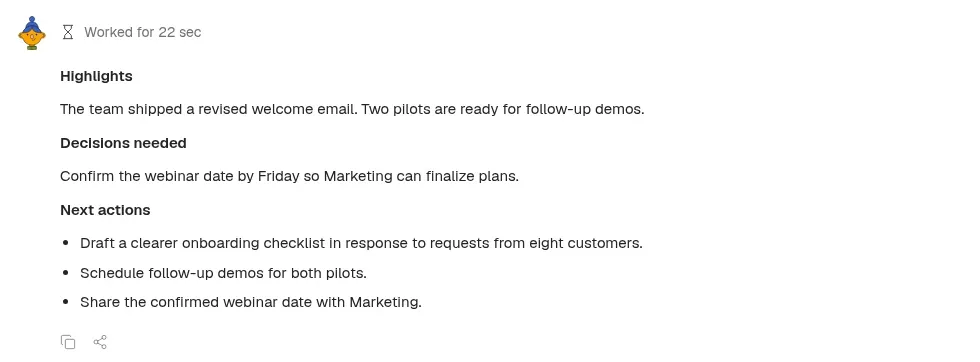
Live product capture, October 5, 2026. The example uses fictional notes; no email was sent and no external business system was changed.
The connector directory is where you find services to connect. The model picker reflects the models and providers enabled for the workspace. Shared workflows provide a reusable process; automations add the schedule or event that starts the work.
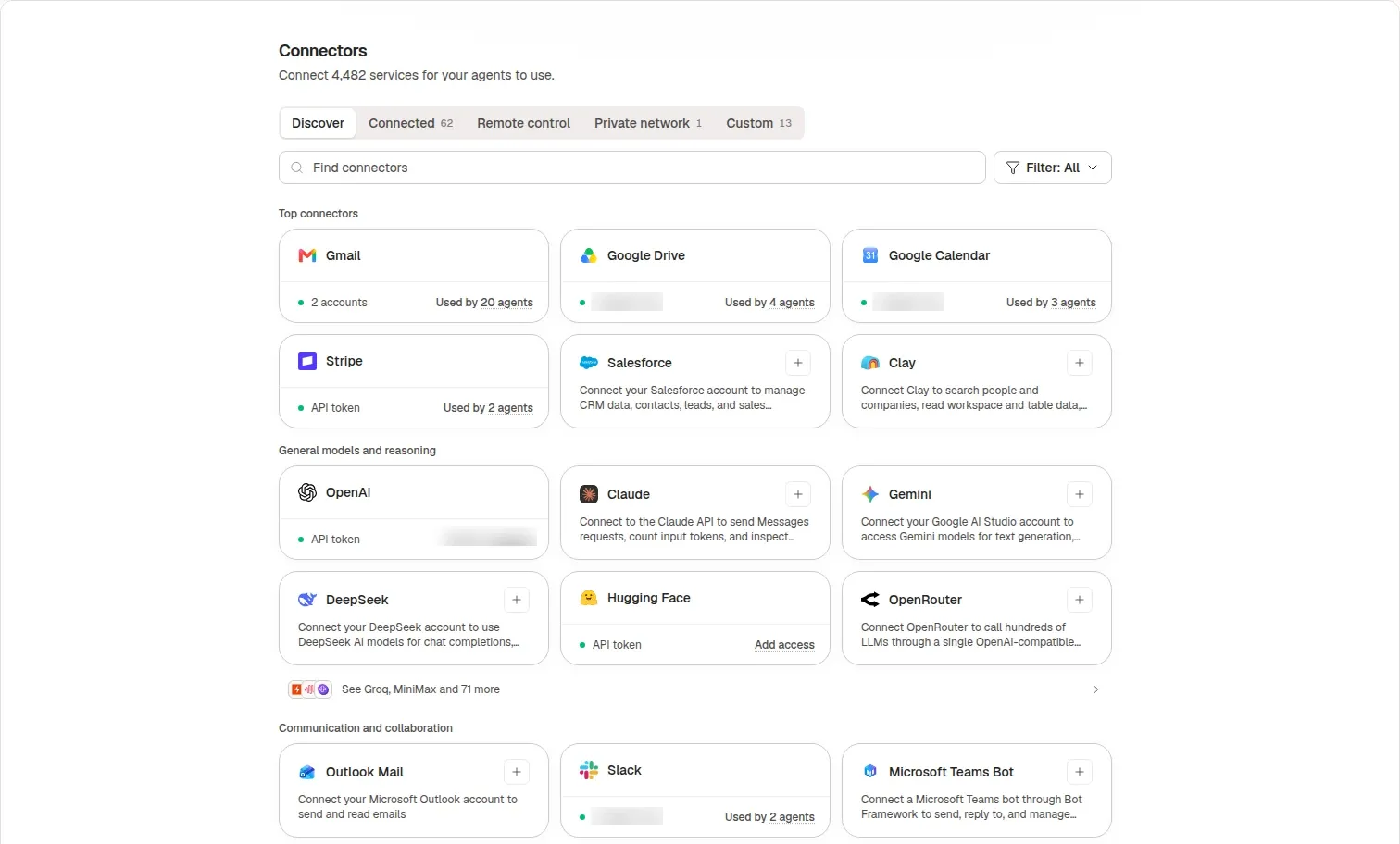
Live product capture, October 5, 2026, with account identifiers blurred. Connector access and permitted actions must be configured for the task.
Consider it for: founders, operators, marketing and sales teams who want business deliverables and ongoing cloud workflows through a shared workspace.
Test before committing: confirm the required connector operations, decide which actions need approval, and review a representative output. Cloud execution can keep a task running when the browser closes, but credits, permissions, external services, and requests for your input still affect completion.
How to choose without buying ten tools
Start with one outcome, then pick two or three candidates whose documented workflow fits it.
- A report, presentation, or research deliverable: evaluate Manus, Genspark, ChatGPT Work, or Okou.
- A recurring job across business apps: evaluate Okou, Lindy, Zapier Agents, Make, or Gumloop against the exact integrations and review steps you need.
- A set of specialized agents with operational governance: look at Relevance AI and the team controls in the other shortlisted platforms.
- Lead research and enrichment: include Bardeen and test data quality directly.
- A software change: keep Claude Code and Codex on the shortlist. A non-developer interface is not a reason to exclude a tool when it fits the actual job.
There are also relevant choices outside this ten-product list. Claude Cowork supports multi-step knowledge work in Claude Desktop, while Claude Tag is built for delegating work in shared Slack conversations. See our team-focused comparison for those distinctions.
Give each candidate the same inputs. Review factual accuracy, completeness, required manual corrections, available app actions, and total cost for an accepted result. The best choice is the one that reliably fits your team's work—not the one with the longest feature list.
Frequently asked questions
Can a non-developer use Claude Code or Codex?
Yes. Neither is restricted to a terminal, and their supported interfaces include more guided experiences. The reason to look elsewhere is task fit and setup preference, not a categorical inability to use them without being an engineer.
Do these tools all provide the same kind of automation?
No. A chat agent, a visual workflow platform, and a prospecting specialist solve different problems. Check whether you need open-ended research, a predictable process, event-triggered work, or a particular kind of business data.
Which is cheapest?
There is no defensible universal answer from the information in this guide. Subscription fees, usage credits, activity limits, connected-service charges, and the work required to correct an output can all matter. Compare current plans and measure a representative task.
Sources and scope
Official sources checked October 5, 2026: Manus documentation, Genspark, ChatGPT usage guide, ChatGPT and Codex plugins, Codex Cloud, Claude Code documentation, Lindy, Zapier Agents, Make AI Agents, Gumloop, Relevance AI, Bardeen, and Okou.
The Okou screenshots were newly captured from the live web app. Recommendations are based on documented capabilities and workflow fit; we did not conduct a controlled performance or pricing benchmark across all ten products. Check current availability and plan details before purchasing.


